Cogitorium
A workbench for agentic development. One binary, your models, your machine. No telemetry.
Everything below describes what the software does today. Where something is absent or unfinished, it says so.
Install
Every route installs the same binary — one Go program with the interface embedded. What differs is who fetches it, and whether the channel can bring Contextverse along.
Contextverse is a real dependency. Context and memory are stored and
versioned by its contextd. Without it the server starts, says so at
GET /api/v1/context/status, and memory does nothing. Homebrew, Scoop and the
container image bring it; the Linux packages recommend it and print the
command; an archive brings nothing and says as much.
| Route | Command | Brings contextd |
|---|---|---|
| Homebrew | brew install orkcom-tech/tap/cogitorium |
yes |
| Scoop | scoop bucket add contextverse https://github.com/orkcom-tech/scoop-bucket then scoop install cogitorium |
yes |
| Docker | docker compose up --build |
yes, in the image |
| deb / rpm | from the releases page | recommends it |
| winget | winget install OrkcomTech.Cogitorium |
declared, not resolved |
| Desktop app | attached to each release | no — install contextd separately |
| Archive | download and unpack | no |
| Kubernetes | helm install from deploy/helm/cogitorium, with --set image.repository |
yes, in the image |
| Source | make build, or make desktop for the window |
no |
Start here if you have never run it: the Guide is a walkthrough from an empty install to agents with tools, with every command and every error message taken from a real run.
Desktop application. Attached to each release for macOS (Apple silicon and Intel), Windows and Linux — the same server and the same interface in a native window instead of a browser tab. It is not a second application: it imports the same code, serves the same bundle and reads the same data directory, so there is nothing in it that can drift out of step with the web shell.
It listens on a port the kernel picks rather than 8688, so a desktop window and
a cogitorium serve can run side by side without either one deciding whether
the other may start. Closing the window ends the session — a server still
running with no window is a process nobody asked to keep.
None of the builds are signed with a platform identity. There is no Apple Developer account and no Windows code-signing certificate for this project, so the first launch is refused by Gatekeeper on macOS and warned about by SmartScreen on Windows. Saying so is better than a signature that is not one:
- macOS — the app is ad-hoc signed so it is not reported as damaged, but it
is not notarised. Open it once with a right-click → Open, or run
xattr -dr com.apple.quarantine /Applications/Cogitorium.app. - Windows — SmartScreen shows More info → Run anyway on first launch. WebView2 supplies the window; it is part of Windows 11 and installed on most Windows 10 machines, and Microsoft’s Evergreen installer covers the rest.
- Linux — unpack the tarball and run
./install.shfor a per-user install under~/.local, or./install.sh --systemfor everyone. The window needs WebKitGTK (libwebkit2gtk-4.1-0on Debian and Ubuntu).
Kubernetes. A Helm chart is in deploy/helm/cogitorium. No container image
is published yet — the chart’s default image.repository points at a registry
path nothing pushes to, so build the image and point the chart at wherever you
pushed it:
docker build -t <your-registry>/cogitorium:0.1.1 .
docker push <your-registry>/cogitorium:0.1.1

helm install cogitorium ./deploy/helm/cogitorium \
  --namespace cogitorium --create-namespace \
  --set image.repository=<your-registry>/cogitorium \
  --set image.tag=0.1.1 \
  --set auth.adminToken="$(openssl rand -hex 24)"
Two things about that deployment are consequences rather than preferences, and
the chart enforces both rather than documenting them. One replica: SQLite
has a single writer, so two pods on one volume corrupt it — there is no
replicaCount value and the strategy is Recreate. Gears are not isolated
there: there is no Docker inside a pod, so a gear runs as a subprocess with
the server’s own file access, and approving one grants it everything the server
has. Because of that the chart refuses, at template time, to enable the in-UI
terminal or the outward gate. Gear execution as Kubernetes Jobs is the fix and
is not built. deploy/helm/cogitorium/README.md has the rest.
From source. Go 1.25 and Node (the UI is built by Vite 7). Docker is optional but strongly recommended — without it, gears run with the server’s own file access and the terminal refuses to open at all.
git clone https://github.com/orkcom-tech/cogitorium
cd cogitorium
make build
./bin/cogitorium serve
Verifying a download. checksums.txt on each release is signed with cosign
keylessly, so what can be checked is not merely that the file is uncorrupted
but that it came from this repository’s release workflow:
cosign verify-blob --signature checksums.txt.sig \
  --certificate checksums.txt.pem \
  --certificate-identity-regexp 'https://github.com/orkcom-tech/cogitorium/.*' \
  --certificate-oidc-issuer https://token.actions.githubusercontent.com \
  checksums.txt
The server listens on 127.0.0.1:8688 and keeps its data in ~/.cogitorium.
Open http://127.0.0.1:8688.
On first start it creates an admin user and prints a token. On a loopback
listen address you are treated as that admin without signing in — that is what
makes a single-operator install feel accountless while running exactly the same
permission model as a team install. Change the listen address to anything other
than loopback and the token becomes required.
Add a model first. A workspace cannot exist without one, because its orchestrator needs something to think with. Go to Models, add a provider, then a model from it.
The idea in five minutes
Three things make this different from a chat window with tools attached.
A model per agent, not per workspace. The agent that reasons about your architecture can be an expensive frontier model while the one that writes release notes is a free local one. The workbench records what each agent spent, so the arrangement can be judged on its actual cost rather than on how it feels.
The wiring is the capability. An agent may delegate only along an edge you drew on the canvas. This is enforced in the runtime, not documented as a convention — remove the wire and the delegation stops being possible.
Tools outlive the conversation. An agent that needs a capability can forge one, and it lands in a catalog rather than evaporating with the session. It runs only after you approve it, and only inside a container.
Workspaces, agents and the orchestrator
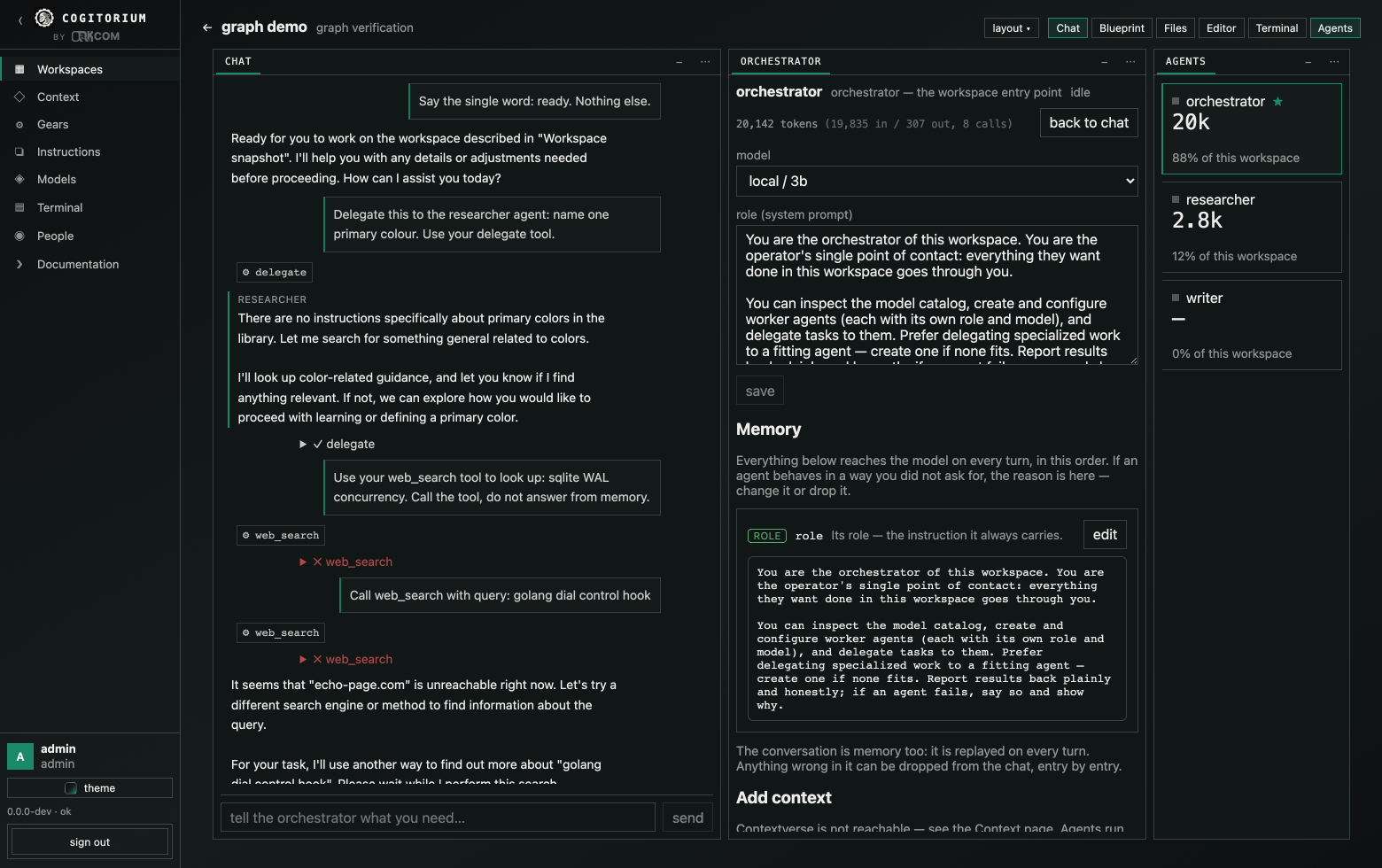
A workspace is a group of agents behind one chat. The agent you talk to is the orchestrator; it is created with the workspace and cannot be deleted.
Talking to it is the only way in, by design. It can:
| It can | Tool |
|---|---|
| list the model catalog | models_list |
| list, create and reconfigure agents | agent_list, agent_create, agent_update |
| wire agents together | wire_create |
| hand work to an agent it is wired to | delegate |
| build a new tool | forge_gear |
| find and share existing tools | list_gears, grant_gear |
| read and write the instruction library | list_instructions, read_instruction, save_instruction |
| attach or detach context documents | context_list, context_bind, context_unbind |
| search the web, if you have granted it | web_search |
Worker agents get a smaller set: delegate, the gear tools, the instruction
tools, and web_search when granted. Workspace management belongs to the
orchestrator alone.
A turn runs at most 16 tool iterations, and delegation nests at most 4 deep. Both are compiled in.
Every step is on the timeline — the tool called, its arguments, its result, and any error. You can delete an entry, and deleting it is genuinely forgetting: the timeline is replayed into the model on every turn, so removing a line removes it from what the agent knows.
The blueprint
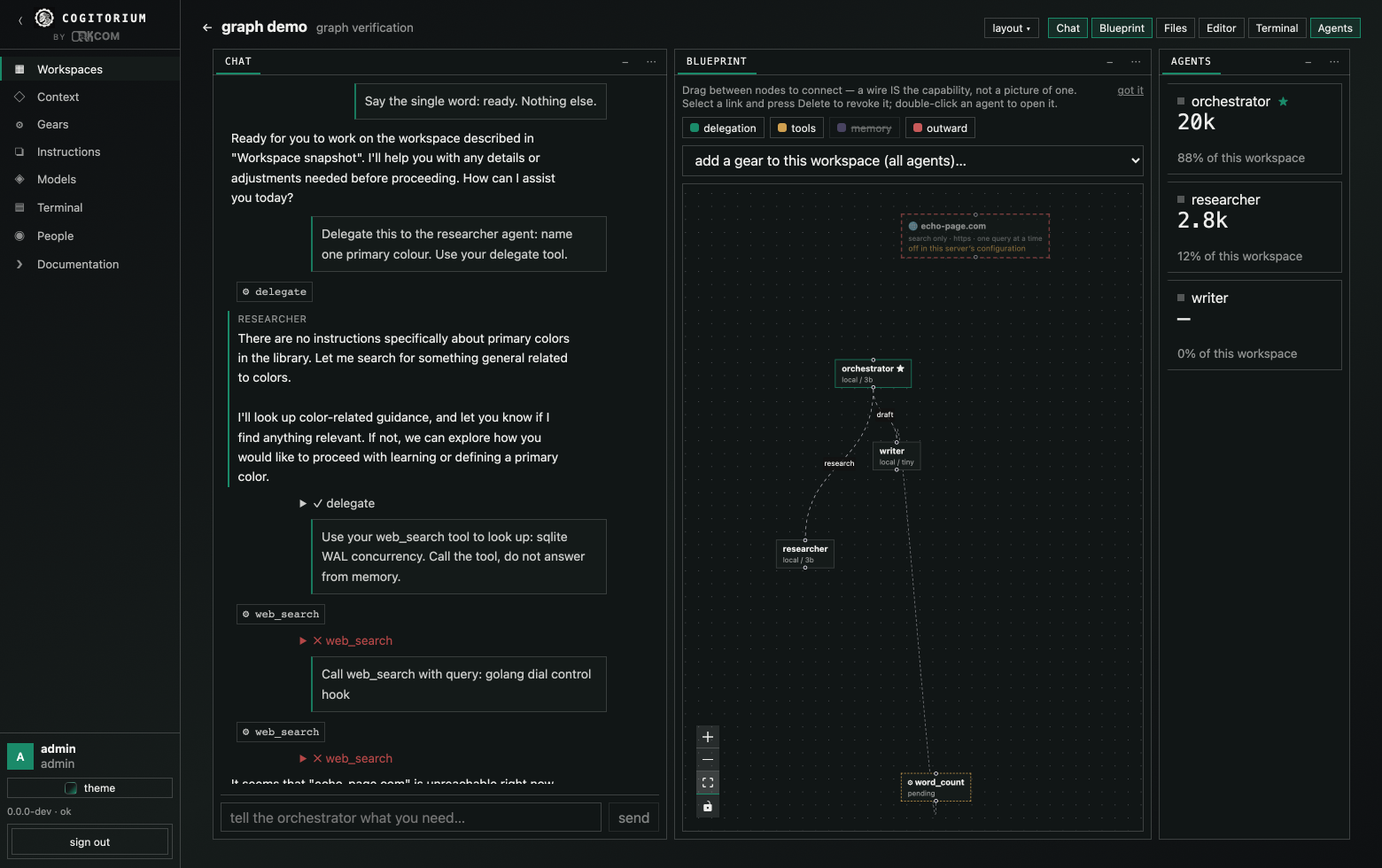
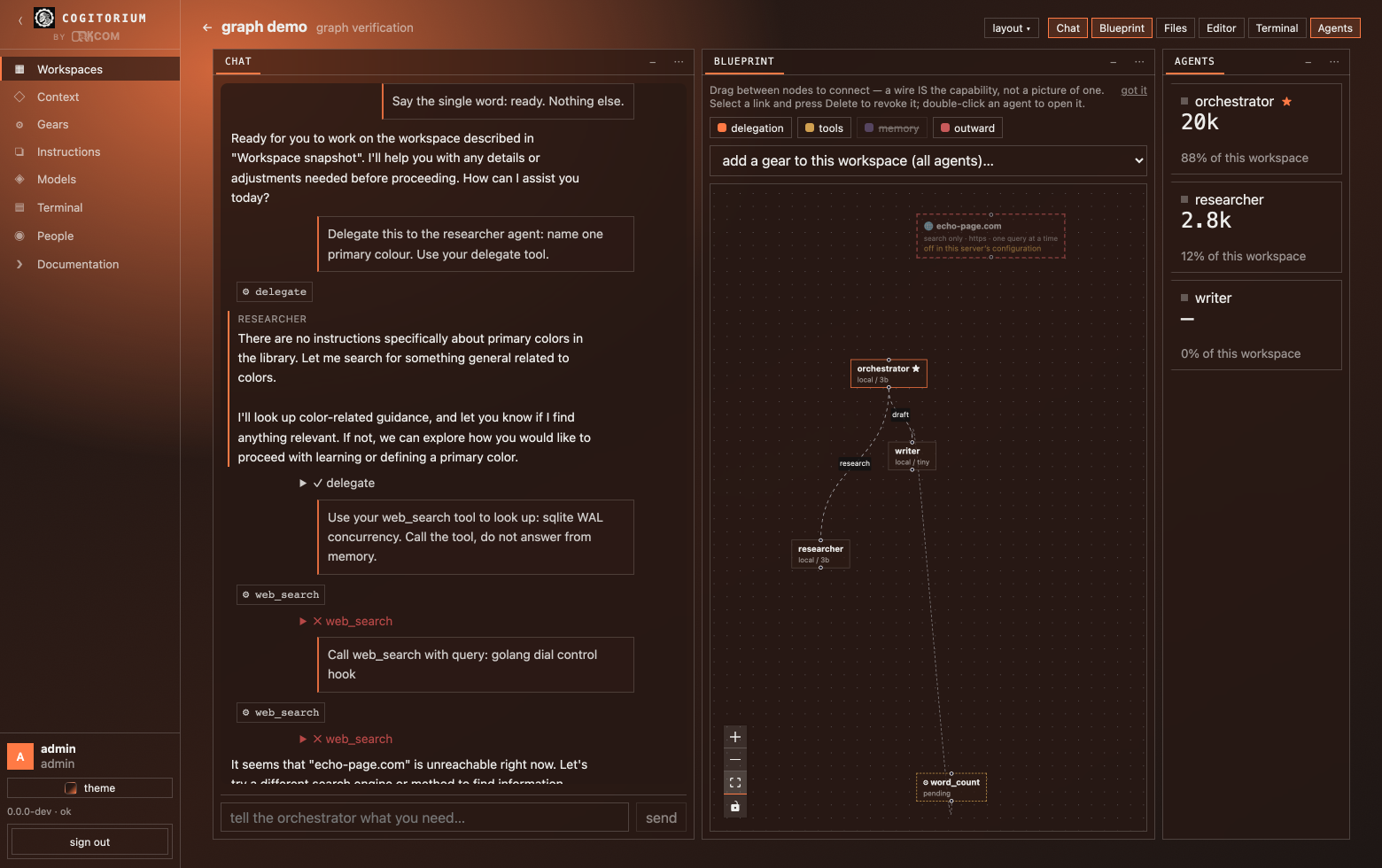
The canvas holds four layers you can switch independently:
- delegation — who may hand work to whom
- tools — which gears each agent may call
- memory — the branches and documents each agent reads
- outward — which agents may ask to search the web
Drag between two agents to create a wire. Drag a gear onto an agent to grant it. Select an edge and press Delete to revoke it. Double-click an agent to open its inspector.
Nodes are coloured and captioned by kind, and the legend names every colour it uses — a canvas where everything looks alike is a picture of connectivity, not an explanation.
Gears — tools your agents build
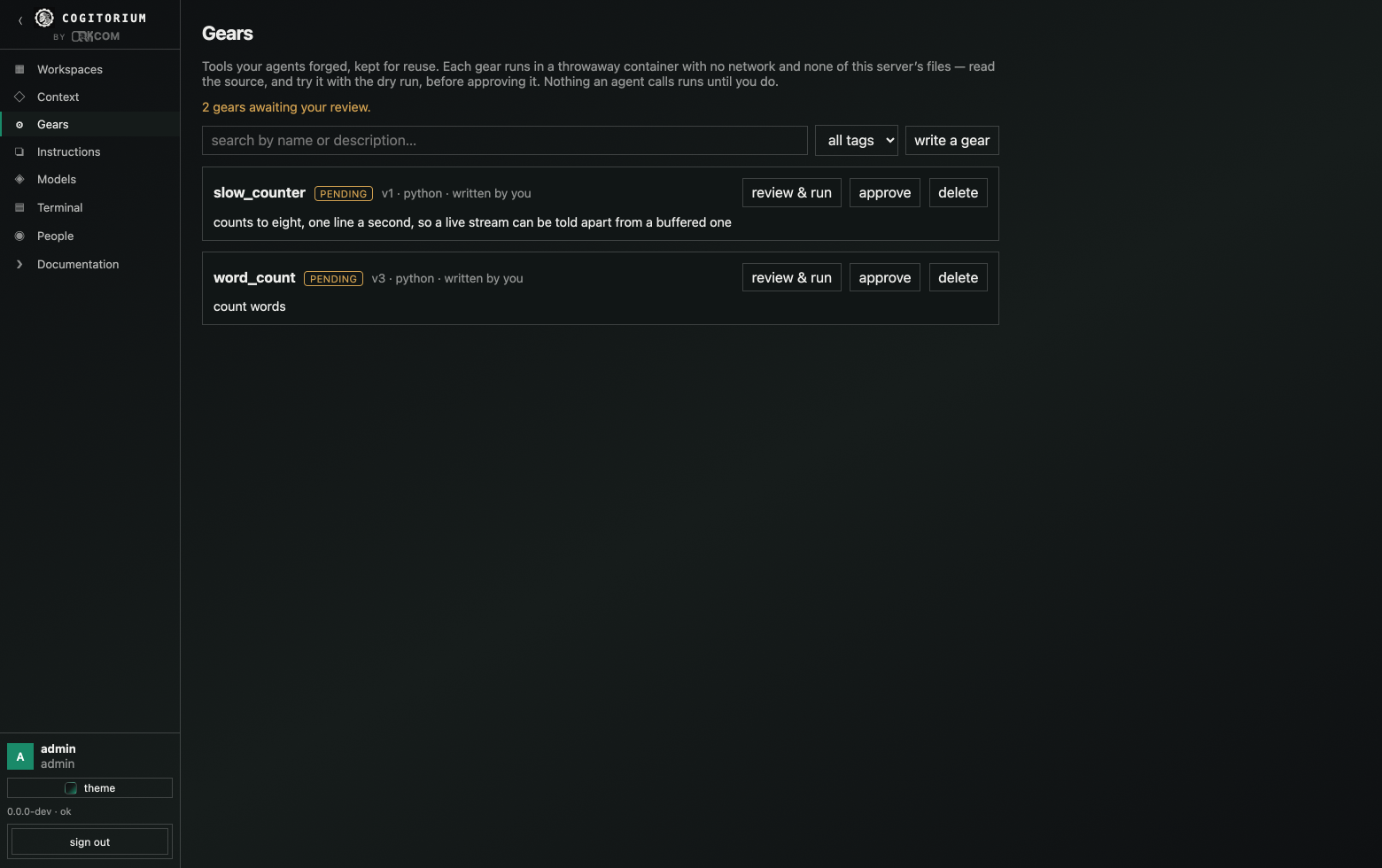
A gear is a small program with a name, a description and an argument
schema. Runtimes are python, node and bash. Gears can also be a binary you
upload.
The lifecycle is deliberate:
- An agent forges a gear, or you write one yourself in the UI. It is created pending.
- Pending gears can be dry-run. Nothing else can call them.
- An admin approves it. Only then can agents invoke it.
- It can be disabled later without being deleted.
Gears enter one global catalog tagged with which workspace produced them. Bind a gear to a whole workspace or to individual agents; the agent that forged it is bound automatically and can grant it to others.
Isolation. With Docker available, a gear runs in a container started with
--network none, --cap-drop=ALL, --security-opt no-new-privileges,
--user 65534:65534, --pids-limit 256, --memory 512m and --cpus 1. Its
files are copied in rather than bind-mounted, so the container sees only its own
code. Each gear has its own timeout, and every run records stdout, stderr, exit
code and duration.
This is not decoration. Before it existed, a gear could read the server’s SQLite file and print a provider API key; that was demonstrated, and the sandbox is the fix. Without Docker the server says plainly that gears run unsandboxed rather than implying otherwise.
Running without Docker. sandbox: subprocess, or auto on a machine where
the daemon does not answer, drops to a plain subprocess. What that costs, and
what still holds:
- The gear runs as the account the server runs as, with its file access. It can read the database and the provider keys in it. Approval is then the only control, which is why the server logs a warning at startup and the gear catalog says so on the page rather than in a footnote.
- Dry runs are refused entirely. Unapproved code never runs at all here — the one path that bypasses approval exists only because a container makes it cheap, so without a container it is closed.
- The terminal is refused, for the same reason: a shell would hold the server’s own access.
- The environment is still minimal —
PATH,HOMEand the gear’s name, never the server’s own environment, which may hold credentials. - A gear gets its own process group and the timeout kills the group, not just the process it started. Before that, a gear that backgrounded anything outlived its timeout and blocked the call forever, because the orphan held the output pipes open and the wait never ended. On Windows the equivalent is a Job Object with kill-on-close, which does the same job — with two caveats stated in the source: a microsecond-wide window between the process starting and being assigned to the job, and the fact that this path has been compiled for Windows but not run there.
- There are no memory, CPU or process-count ceilings. Docker supplies those; nothing else does.
Watching a run. A dry run reports its output as the gear produces it rather than in one lump at the end, so a gear with a sixty-second timeout is a visible process instead of a spinner. stdout and stderr are shown interleaved in the order they actually arrived — splitting them puts an error above the line that caused it. The recorded run is identical either way: whether anyone was watching never changes what is stored.
Context and memory
Context is stored and versioned by
Contextverse, driven through its
contextd CLI. Cogitorium owns the bindings — which document feeds which agent
— and never owns the content.
Each workspace gets a branch, and each agent a sub-branch beneath it, frozen at creation:
workspaces/<slug>-<id>/shared
workspaces/<slug>-<id>/agents/<slug>-<id>
An agent reads its own branch and the workspace’s shared branch implicitly. Anything else is an explicit binding, made to the whole workspace or to one agent.
The agent inspector shows everything that reaches the model on every turn, in order, with each item marked as its role, its own memory, shared memory, a bound document or an instruction. Items can be edited or removed. That last part exists for a specific failure: an agent that remembered something you never wanted it to keep, and kept bringing it up.
The instruction library is a catalog of reusable instruction texts, so a prompt you have refined once can be attached again rather than retyped. Names are validated (lowercase letters, digits, dashes and underscores) before anything is written, so a rejected save leaves nothing behind.
The interface
Panels on a grid, not tabs. Six slots — left, top, centre, beside-centre, bottom and right — hold chat, blueprint, files, editor, terminal, the agent roster and the agent inspector.
- Place a panel at any edge from its
⋯menu. - Slide out: a dock can push the centre aside or float over it.
- Float a panel into a window you can move, resize, roll up, expand and close.
- Collapse any dock to a rail; the panel stays alive behind it.
- Maximize with
⌘↵, toggle the sidebar with⌘B, the bottom dock with⌘J.
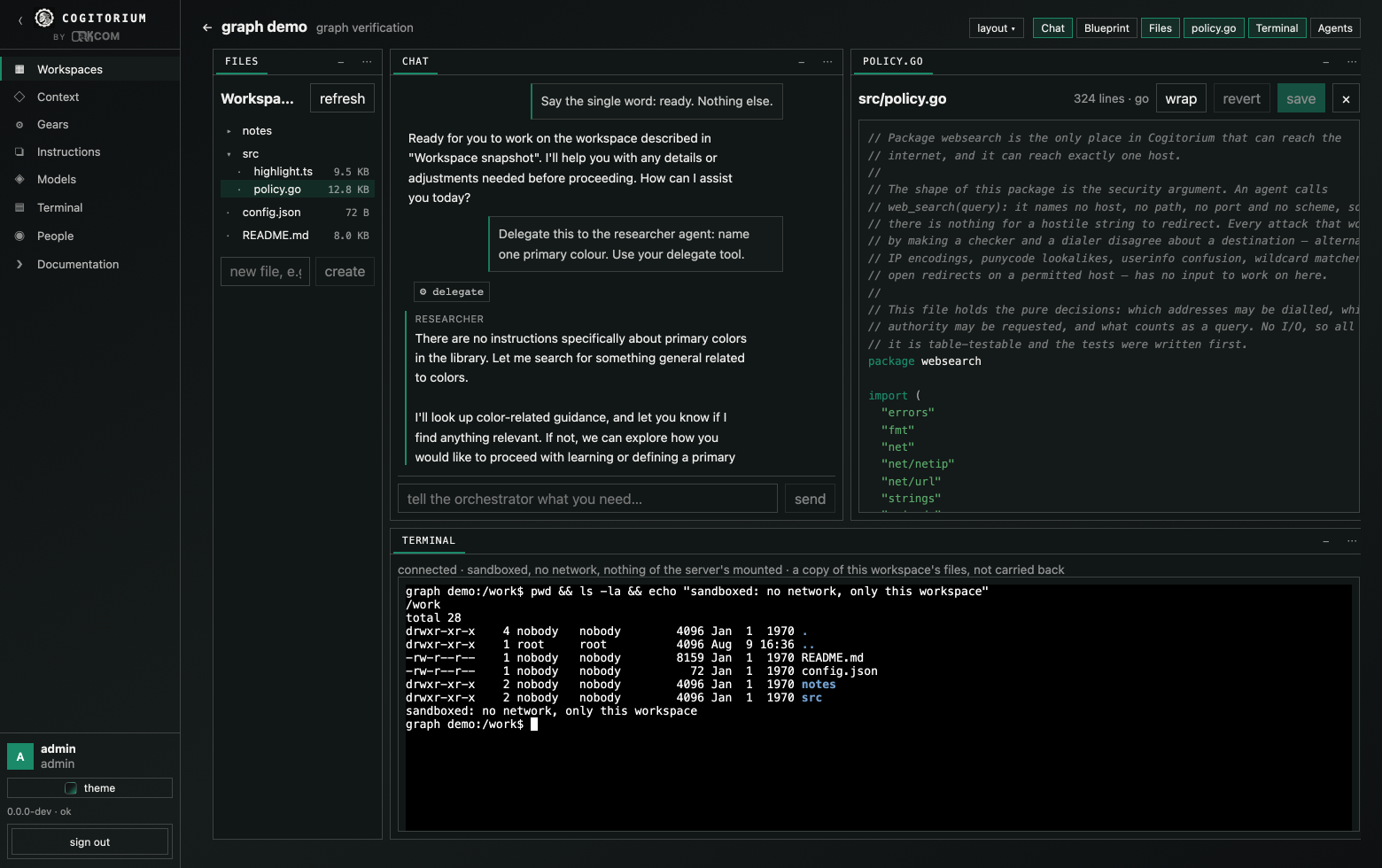
Opening a file clears the bench for it. The tree and the editor are two panels, not two halves of one — a tree is a narrow thing and a file is a wide one, and sharing a width meant the file got whatever the tree left over. Clicking a file puts the blueprint and the rosters away and hands the room to the editor; the conversation and the shell stay, because watching a turn while editing what it produced is why both are on screen. Nothing is destroyed — every panel put away is one chip away in the top bar, and the editor floats out into its own window like any other panel.
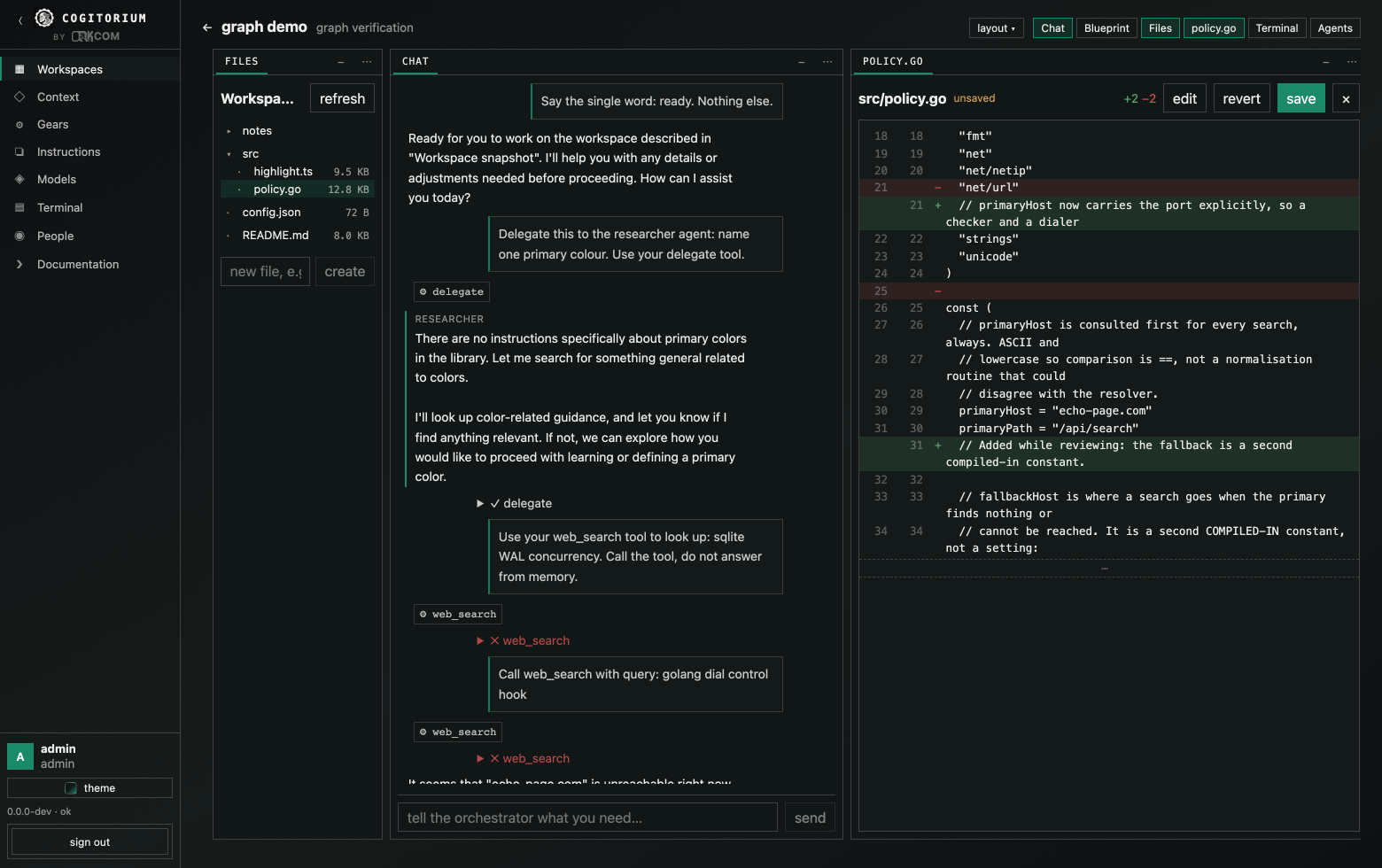
Diffs. With unsaved edits open, changes shows them against what is on disk — two line-number columns, a sign column, and long runs of unchanged lines collapsed with the break drawn rather than silently joined. A gear past its first version offers the same view against the previous one, which is the question that matters there: an approval covers exact content, so what you want before approving v3 is what changed since the v2 you already read.
The editor highlights Go, TypeScript and JavaScript, Python, shell, SQL, JSON,
YAML, TOML, CSS, HTML and Markdown. It is a lexer rather than a parser: it will
not tell a generic from a comparison, and it does not try. ⌘S saves, Tab
indents rather than leaving the field, and long lines wrap on request. Like
everything else here it is written in the product rather than installed — there
is no highlighter library and no editor component behind it.
Layouts persist per browser tab, with a seed for new tabs. Five arrangements
ship ready-made — Converse, Build, Wire up, Canvas-first, Watch one agent — and
you can save your own. ?layout=reset in the URL recovers from anything.
Looks
The interface has two, and they are whole designs rather than a density switch: each carries its own ground, accent, surface treatment and arrangement.
Instrument — a bench instrument. No light at all, hairlines carrying every boundary, nothing rounded, panel names are stencilled in monospace, and every figure is monospaced so a column of token spends lines up down the panel. The conversation stays in the centre. Every screenshot above is Instrument.
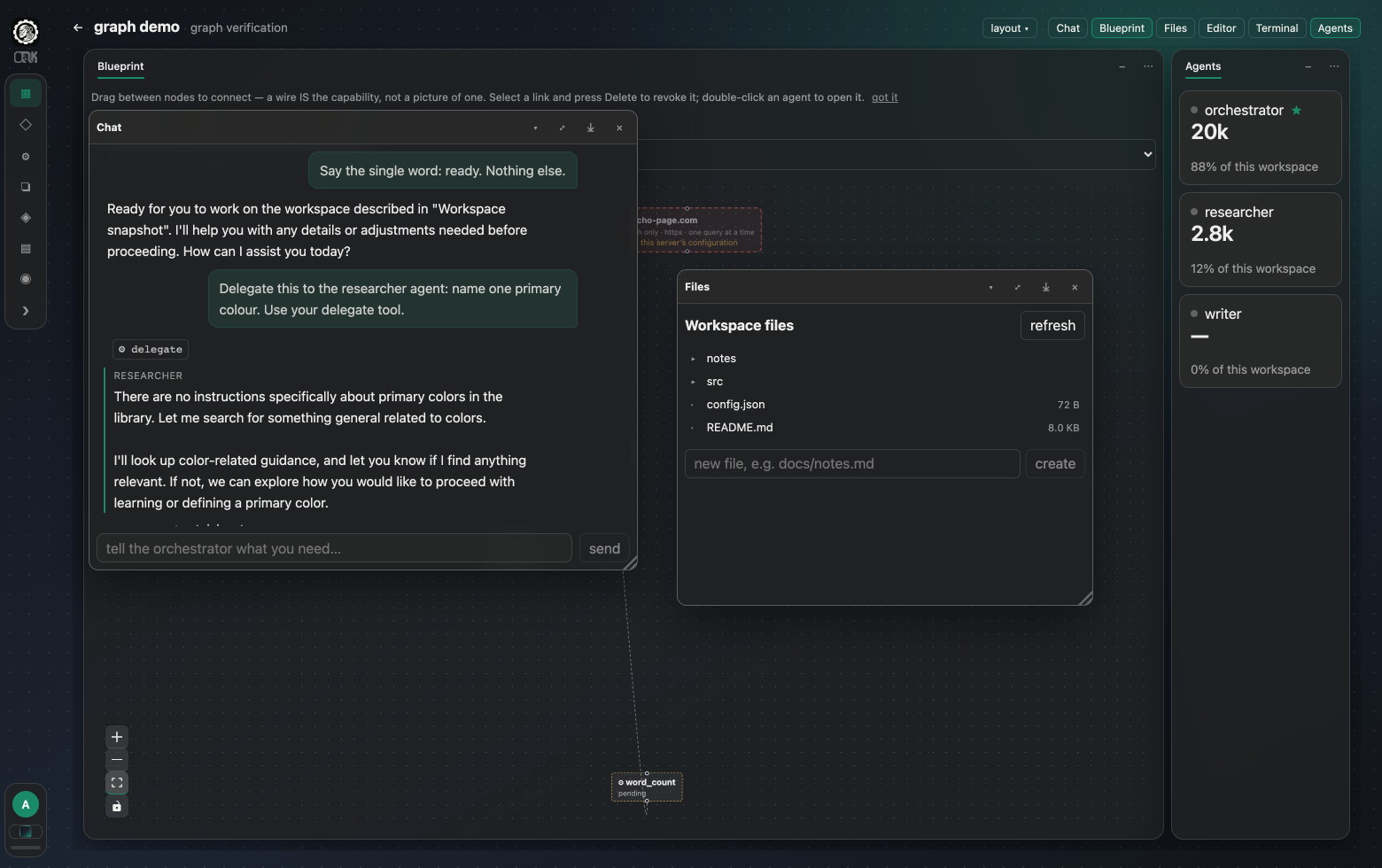
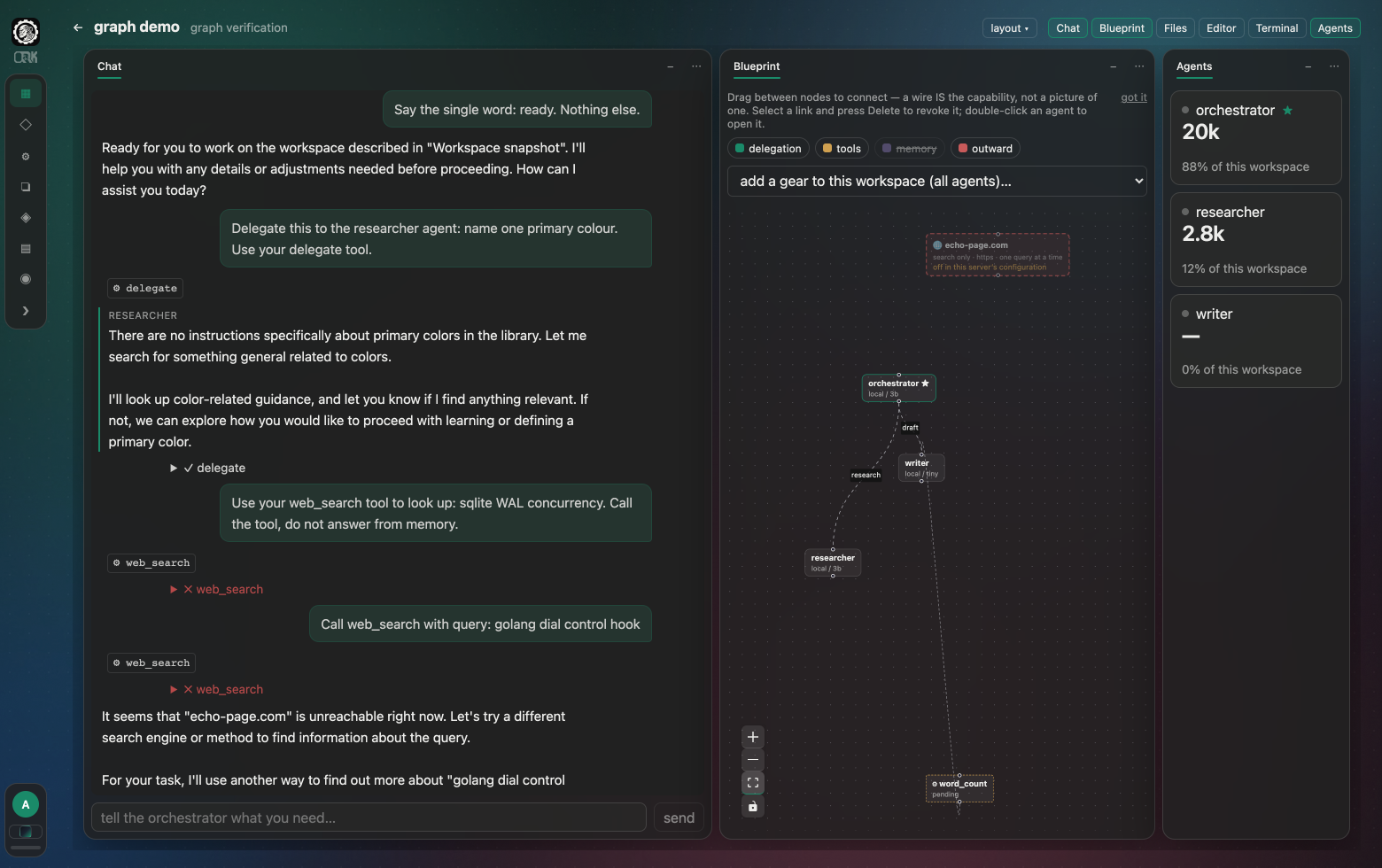
Canvas-first — the wiring graph becomes the application. The menu shrinks to a rail of glyphs, the ground becomes a drafting grid, and panels float over it on shadows instead of dividing it. This deliberately contradicts the rule that the orchestrator chat is the way in, which is why it is a choice and not the default.
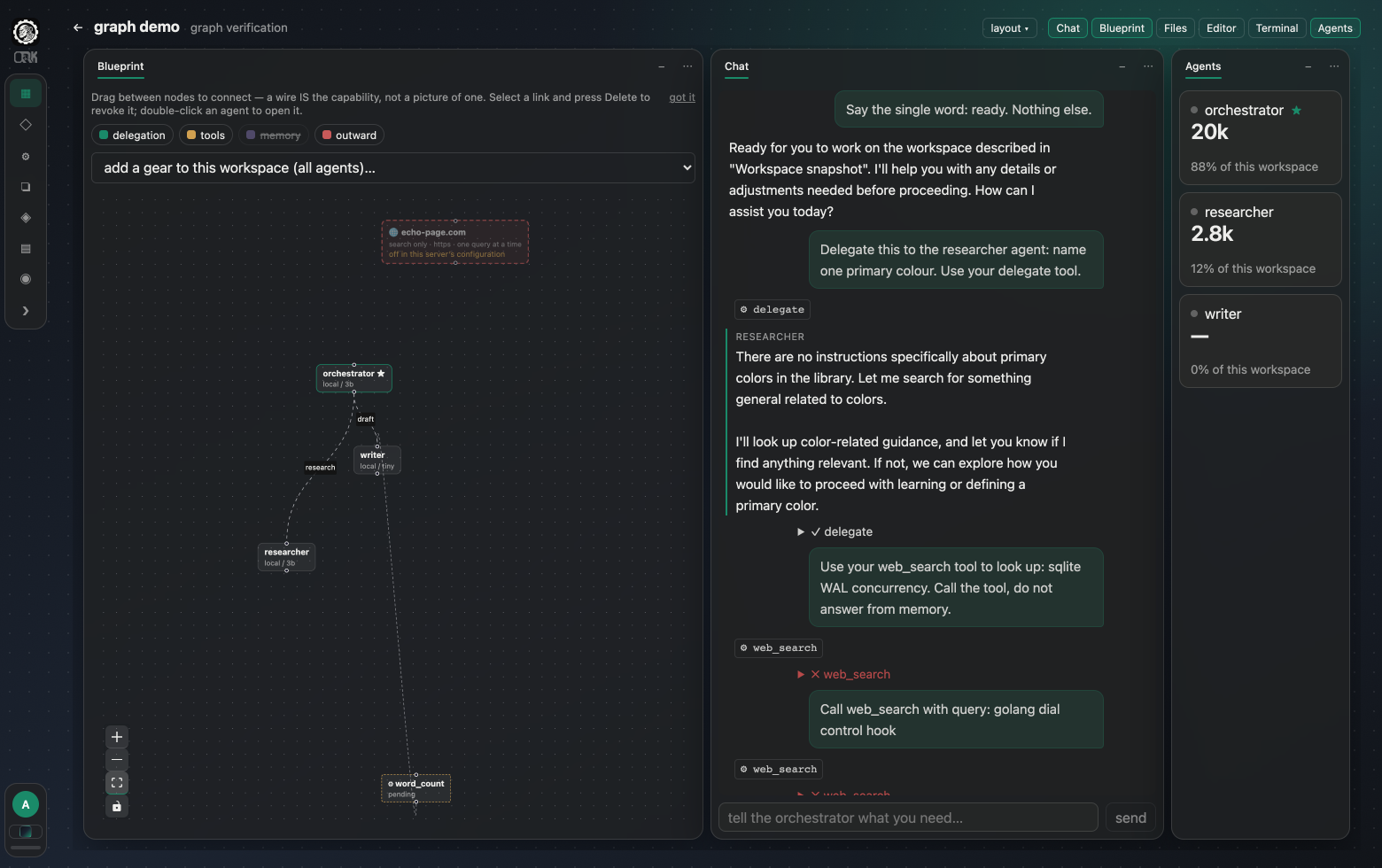
Choosing a look applies its arrangement too — picking Canvas-first and then hunting for a matching layout preset would be two decisions for one intention. A plain reload never overwrites an arrangement you built by hand.
Palette
Independent of the look, so either one can wear any of it.
One to three colours make the background gradient, and when there is a third it becomes the accent. Dials control grain and tint; the light has a strength dial whose left end is off, and while there is any it can be placed by hand or set drifting slowly around the screen. Turning it off hides the position pad and the drift with it — where the light falls is not a question worth asking when there is none. Panels are frosted glass or solid fill — solid genuinely switches the compositing off rather than blurring by zero — with the blur and the fill darkness on their own sliders. Five palettes ship ready-made: Graphite, Lime, Cobalt, Ember, Moss.
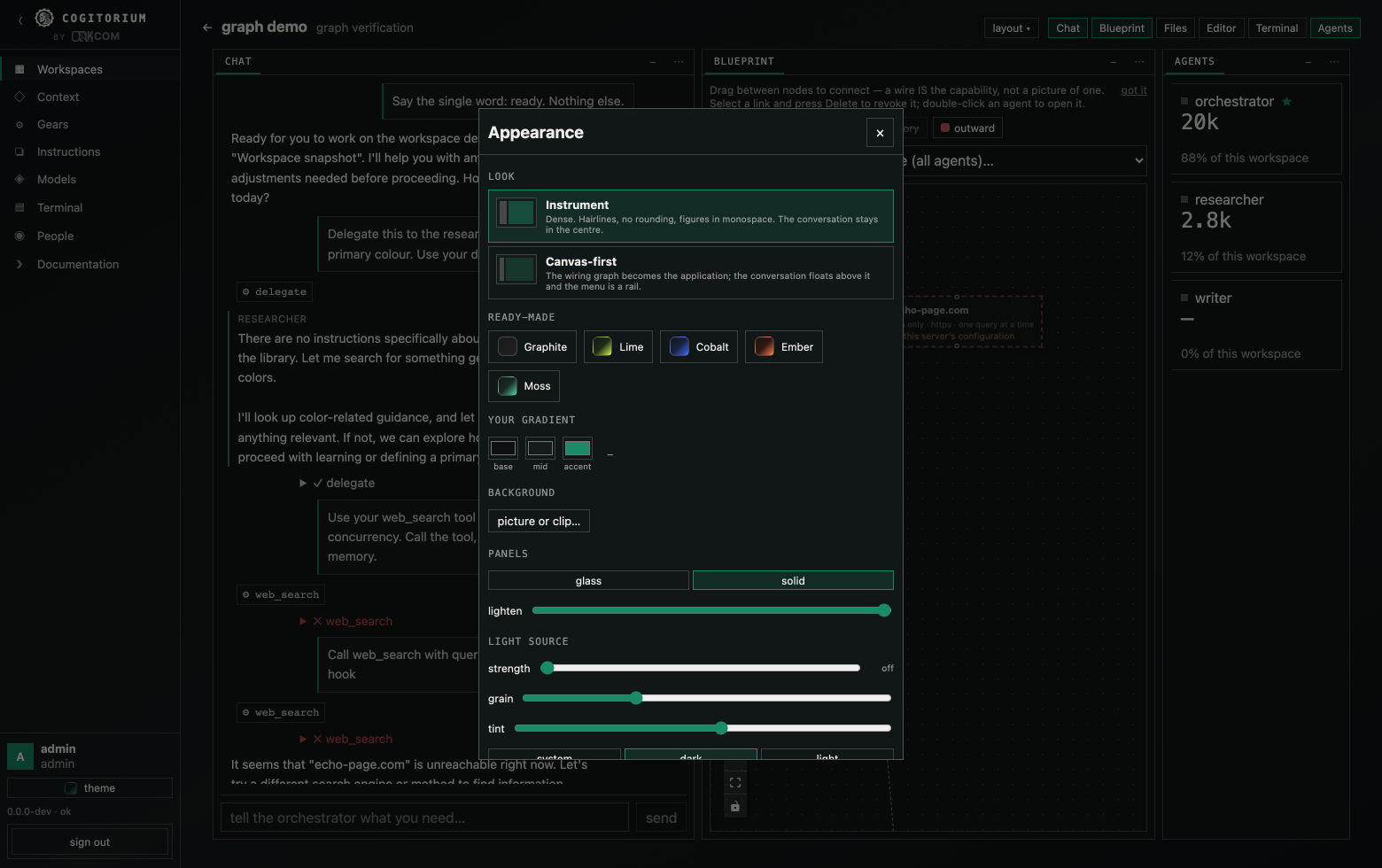
You can put your own picture or looping clip behind everything, with a scrim dial so text stays readable over whatever you chose.
Light and dark both work and follow the system unless you pin one. In light mode the palette becomes a tint carried into a light ground rather than the ground itself, so your colours choose the character of the room without deciding whether it is lit.
Everything here is stored on your device, and the interface fetches nothing at runtime: the grain texture, the maker’s mark and your own backdrop are all carried inside the page. Nothing about your appearance settings leaves the machine.
Teams and access
Three roles: admin, team-lead, member.
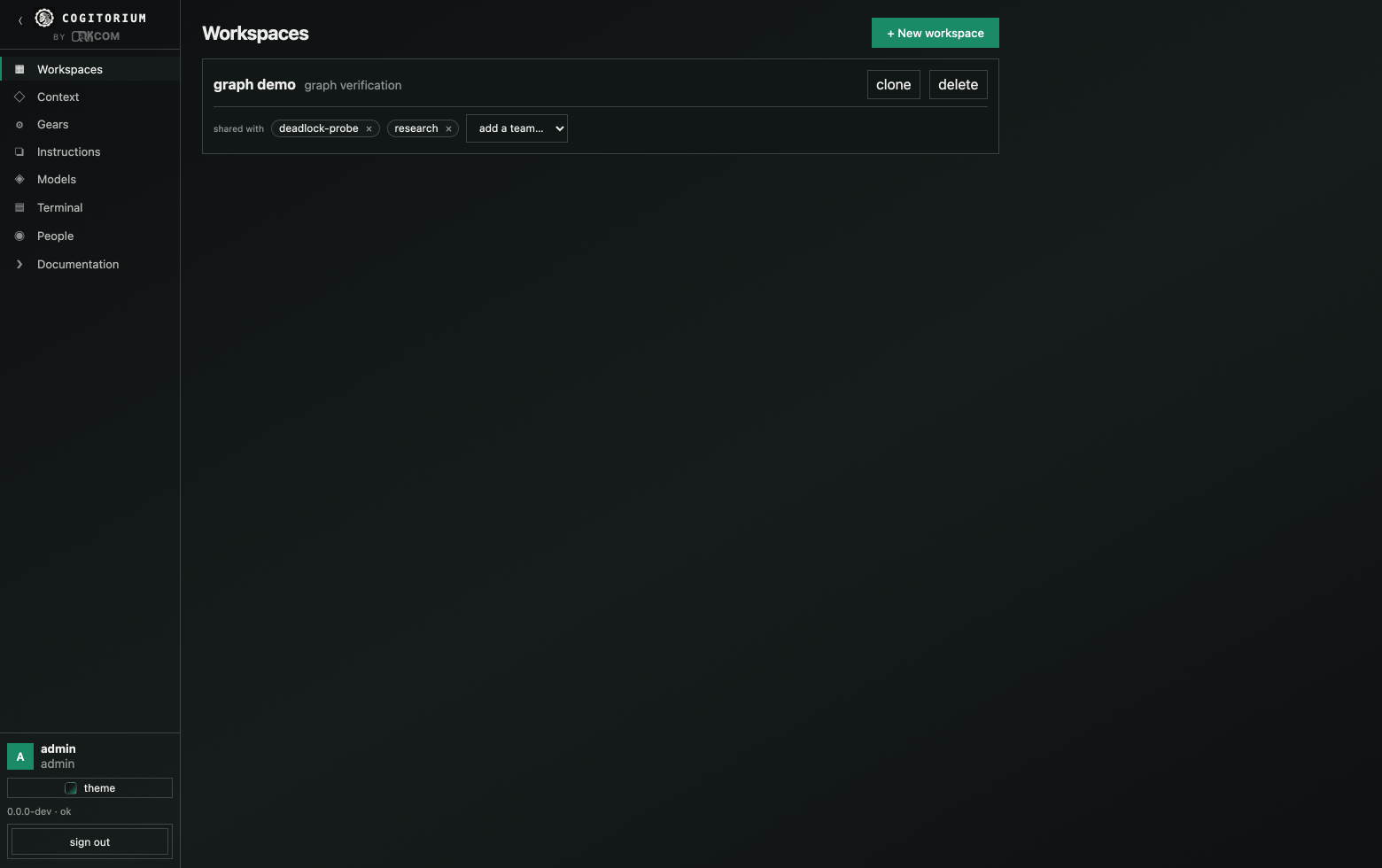
A workspace belongs to whoever created it and can be shared with any number of teams. Sharing is additive — withdrawing one team leaves the others untouched. A user sees a workspace if they are an admin, if they own it, or if they belong to any team it is shared with.
Clone copies a workspace’s agents, wiring and gear grants to you, leaving the original’s conversation behind. That is how two people run the same setup without sharing one.
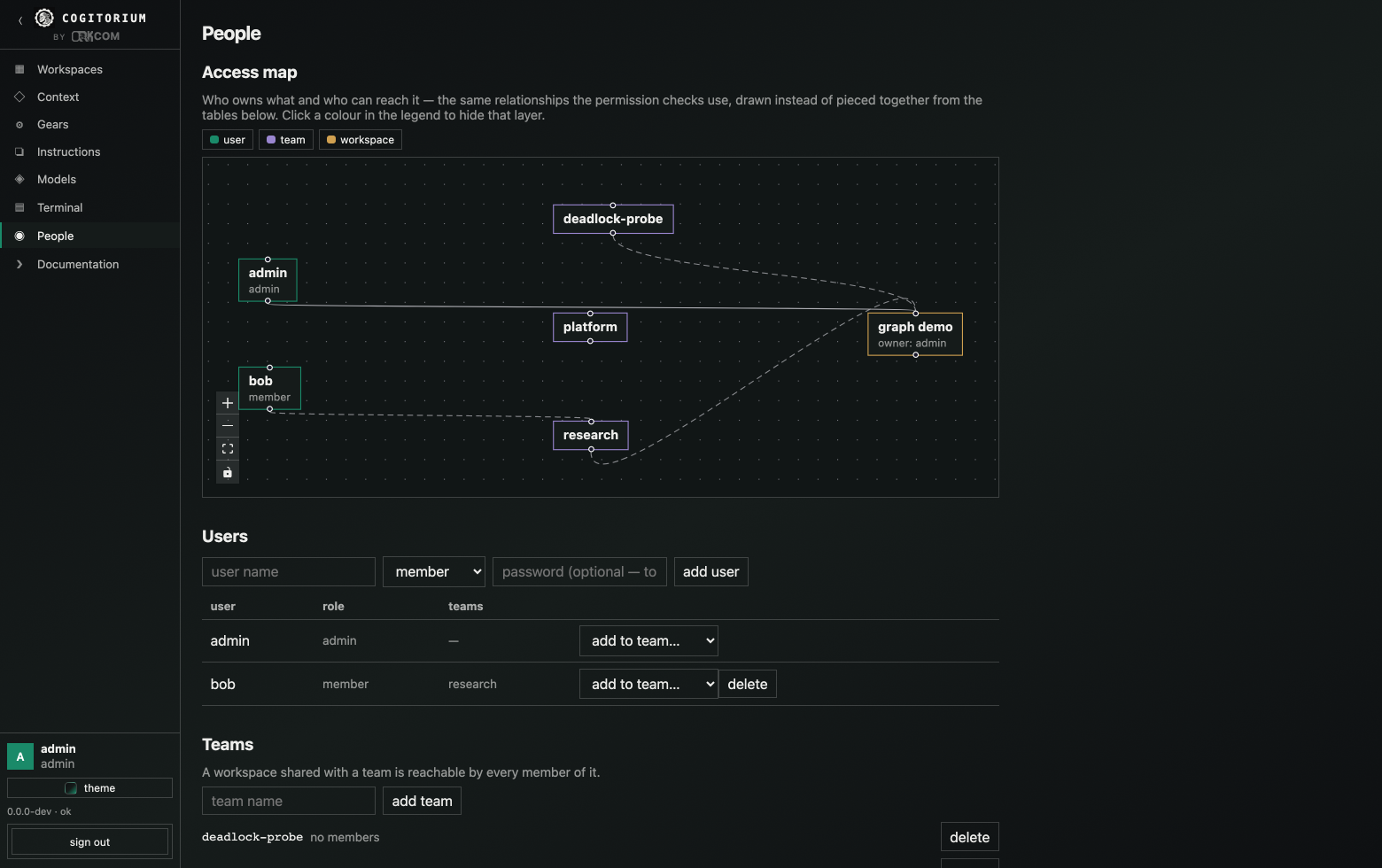
Admins get a map of the whole thing: users, teams, workspaces, and the owns / shared / member relationships between them.
Letting agents reach the web
Off by default. Agents cannot reach the network at all until egress: true
is set in the configuration and the server restarted. There is no route and no
database row behind that switch, so nothing running inside Cogitorium has a code
path to enable it.
The switch alone grants nothing. Two more things must be true:
- An agent needs a grant, drawn by a human on the blueprint by wiring it to the internet node. The grant is bound to a fingerprint of that agent — its role, its model and its bound documents. Change any of them and the grant lapses until a human reviews it again.
- Every individual search stops the turn and asks you to approve that exact query. There is no “allow for this turn” and no “remember this agent”.
Agents never choose a destination. They supply words; the destinations are compiled into the binary. Searches go first to echopage and fall through to a general engine when it has nothing.
Limits, all enforced in code: 3 searches per turn across the whole delegation tree, 256 characters per query, 40 per agent per 24 hours. Once a search result enters a turn, tools that write durable state — the instruction library, gear forging, context bindings, agent and wire changes — are refused for the rest of that turn.
Every attempt is recorded before it is sent: the query verbatim, who approved it, how they authenticated, and which service answered.
Stated plainly: this bounds and records outbound traffic. It does not prevent exfiltration, because a query string is itself a channel and no allowlist closes that. What it gives you is a hard cap, a full record, and a human in the loop — a leak someone approved rather than a silent one.
The terminal
Off by default. Set terminal: true and restart. It requires a sandbox: without
Docker the request is refused rather than served with the server’s own file
access.
A workspace terminal is scoped to that workspace’s directory and open to its members. A server-wide terminal is admin-only. No agent can open either.
Configuration reference
Configuration comes from, in order of precedence: command-line flags, then
COGITORIUM_* environment variables, then config.yaml in the data directory,
then defaults.
Key (config.yaml) |
Environment | Default | What it does |
|---|---|---|---|
listen |
COGITORIUM_LISTEN |
127.0.0.1:8688 |
HTTP listen address. A non-loopback address turns off implicit-admin. |
data_dir |
COGITORIUM_DATA_DIR |
~/.cogitorium |
SQLite database and server-owned files. |
log_level |
COGITORIUM_LOG_LEVEL |
info |
debug, info, warn, error. |
contextd_path |
COGITORIUM_CONTEXTD |
contextd |
How to find the Contextverse CLI. |
sandbox |
COGITORIUM_SANDBOX |
auto |
auto, docker or subprocess. auto uses Docker when it answers and says so when it cannot. |
sandbox_image |
COGITORIUM_SANDBOX_IMAGE |
python:3.12-alpine |
The image gears run in. |
terminal |
COGITORIUM_TERMINAL |
off | Enables the in-UI shell. Requires a sandbox. |
egress |
COGITORIUM_EGRESS |
off | Master switch for agents reaching the web. |
egress_key |
COGITORIUM_EGRESS_KEY |
— | Credential for the search service. Required when egress is on. |
egress_approval_bearer |
COGITORIUM_EGRESS_APPROVAL_BEARER |
off | Requires a real signed-in token to grant or approve egress, refusing implicit loopback admin. |
--config points at a config file; --listen, --data and --log-level are
the only flags. Booleans are strict: only 1 and true enable, so
COGITORIUM_EGRESS=0 is a working off-switch over a file that says otherwise.
The server refuses to start if egress is enabled without a sandbox, without a
credential, or with any *_PROXY variable set — a proxy would make every
address check inspect the proxy instead of the real destination while reporting
itself enforced.
Security model
What is actually true, without softening:
- Gears run in a container with no network, no capabilities, an unprivileged user and their own files only — and only after an admin approves them. Without Docker they run with the server’s file access, and the interface says so.
- The terminal is off by default, requires a sandbox, and is never reachable by an agent.
- Egress is off by default and needs two human decisions plus a per-query approval. It bounds and records; it does not prevent exfiltration.
- Provider credentials can only be changed by an admin, and repointing a provider’s URL requires supplying the key again — otherwise the server would deliver its own credential to an address its owner never named.
- The global context browser is admin-only, because it reaches every workspace’s memory and every agent’s private branch. Per-branch access for non-admins does not exist yet; until it does, an unrestricted reader would be a hole.
- Loopback trust: on a loopback listen address, an uncredentialed local
request is treated as the admin. Anything on your machine that can open a
socket to the port can therefore act as you. Set a non-loopback listen address,
or
egress_approval_bearer: true, to require a real token for the decisions that matter most. - No telemetry. There is no analytics, crash reporting or update check in this codebase. The binary talks to the providers you configured and nothing else.
Known issues
Open defects, stated rather than discovered. Each one is real, reproduced, and has a fix that deserves its own thinking rather than a quick loosening.
A shell does not survive a reload. Restoring a layout brings the terminal panel back, not the session — the previous shell is gone along with its scrollback and working directory. This is deliberate rather than broken, and it is stated here because the panel coming back empty looks like a fault.
The shell works on a copy, and nothing is carried back. A workspace’s files are streamed into the container when the session opens; the shell can read and write them, and everything it wrote is discarded when the session ends. Use the file tree and the editor for changes meant to last. Syncing the two directions is a design question — a session that overwrote a file you had edited in the UI meanwhile would be a worse bug than this one — so it is deliberately not done until it is designed.
Licence
Business Source License 1.1. Production use is granted, including commercially, provided you are not offering Cogitorium to third parties on a hosted or embedded basis competitive with our own products. It converts to Apache 2.0 on 2030-08-08.