Guide
Every command below was run against a real install, and every error message is the exact text the software produces. Where something does not exist, it says so rather than describing what it might look like.
The examples use http://127.0.0.1:8688, the default. On a loopback address you
are the admin without signing in, so no Authorization header appears in them —
add -H "Authorization: Bearer $TOKEN" to every call if your server listens
anywhere else.
1. From nothing to an answer
Install and start
brew install orkcom-tech/tap/cogitorium && cogitorium serve
Other routes are in Install. The server listens on
127.0.0.1:8688 and keeps everything in ~/.cogitorium. Open
http://127.0.0.1:8688.
serve takes exactly four flags — --config, --data, --listen,
--log-level — and the binary has exactly two subcommands, serve and
version. There is no --port, no --debug, and no cogitorium init.
The token, and when you need it
On first start the log carries one line you cannot get back:
admin token created; local requests are admin automatically token=cg-admin-b1e87f6…
You do not need it on your own machine — a request from loopback is the admin. You need it the moment the server listens anywhere else. Only the SHA-256 hash is stored, so a lost token cannot be recovered; there is no reset command.
Two things people try here that do not work:
- Pasting the token into the login form. The login card has three fields —
server, user, password — and none of them is for a token. The seeded admin has
no password at all, so it answers
invalid username or password. -
Reaching a Docker install and expecting to be the admin. Inside the container the server listens on
0.0.0.0, so your request is not loopback:{"error":{"message":"authentication required: send Authorization: Bearer <token>"}}
To give the admin a password — there is no screen for this, only the route:
curl -X PUT http://127.0.0.1:8688/api/v1/users/1/password -H 'Content-Type: application/json' -d '{"password":"correct-horse-battery"}'
A provider and a model
A workspace cannot exist without a model, because its orchestrator needs something to think with. Until the catalog has one, + New workspace is disabled and the page says so:
A workspace needs a model for its orchestrator, and the catalog is empty. Add one under Models first.
Go to Models → fill in the provider row → add provider, then add a model from the provider’s card. Or:
curl -X POST http://127.0.0.1:8688/api/v1/providers -H 'Content-Type: application/json' -d '{"name":"local","type":"openai-compatible","base_url":"http://127.0.0.1:11434/v1","api_key":""}'
{"id":1,"name":"local","type":"openai-compatible","base_url":"http://127.0.0.1:11434/v1","has_key":false}
has_key is the only thing ever said about the key. The key itself is not in
that response, nor in any other — the field holding it is unexported, so the
JSON encoder cannot see it.
Two provider types exist: anthropic and openai-compatible. Anthropic has a
default address; an openai-compatible provider does not, and leaving it empty is
refused with “base_url is required for openai-compatible providers”. There is
no environment variable and no config file key for a provider key — the catalog
is the only place keys live.
curl -X POST http://127.0.0.1:8688/api/v1/models -H 'Content-Type: application/json' -d '{"provider_id":1,"model_name":"qwen2.5:0.5b","label":"local / tiny"}'
{"id":1,"provider_id":1,"provider_name":"local","provider_type":"openai-compatible","model_name":"qwen2.5:0.5b","label":"local / tiny"}
A workspace
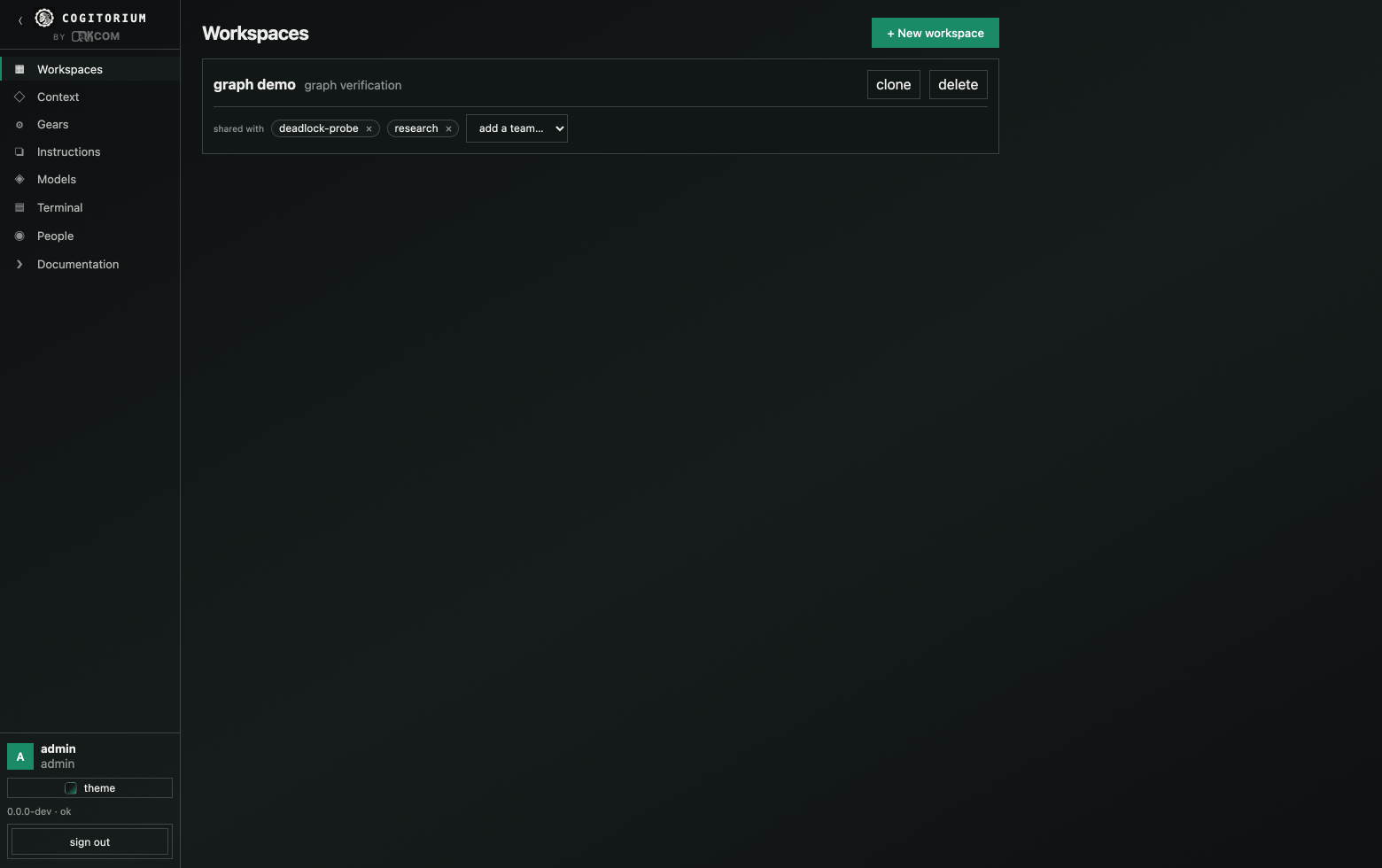
Workspaces → + New workspace → name it, pick the orchestrator model → create workspace. Or:
curl -X POST http://127.0.0.1:8688/api/v1/workspaces -H 'Content-Type: application/json' -d '{"name":"research","description":"release notes","orchestrator_model_id":1}'
{"id":1,"name":"research","description":"release notes","branch":"workspaces/research-1","shared_branch":"workspaces/research-1/shared","owner_id":1,"team_ids":[]}
Name a model id that is not in the catalog and you get 404 {"error":{"message":"model 1: not found"}} — the workspace is not half-created.
The workspace opens with one agent already in it, called orchestrator. Type
into tell the orchestrator what you need… and press send. That is the
whole first loop.
2. A second agent
There is no add-agent button anywhere in the interface. Worker agents are created by the orchestrator, on your instruction, or through the API. That is deliberate: the orchestrator is the operator’s single point of contact.
Ask for one in the chat:
Create a worker agent named researcher with the role “You summarize sources accurately and cite them.” and delegate to it: summarise what a blueprint wire does in this product.
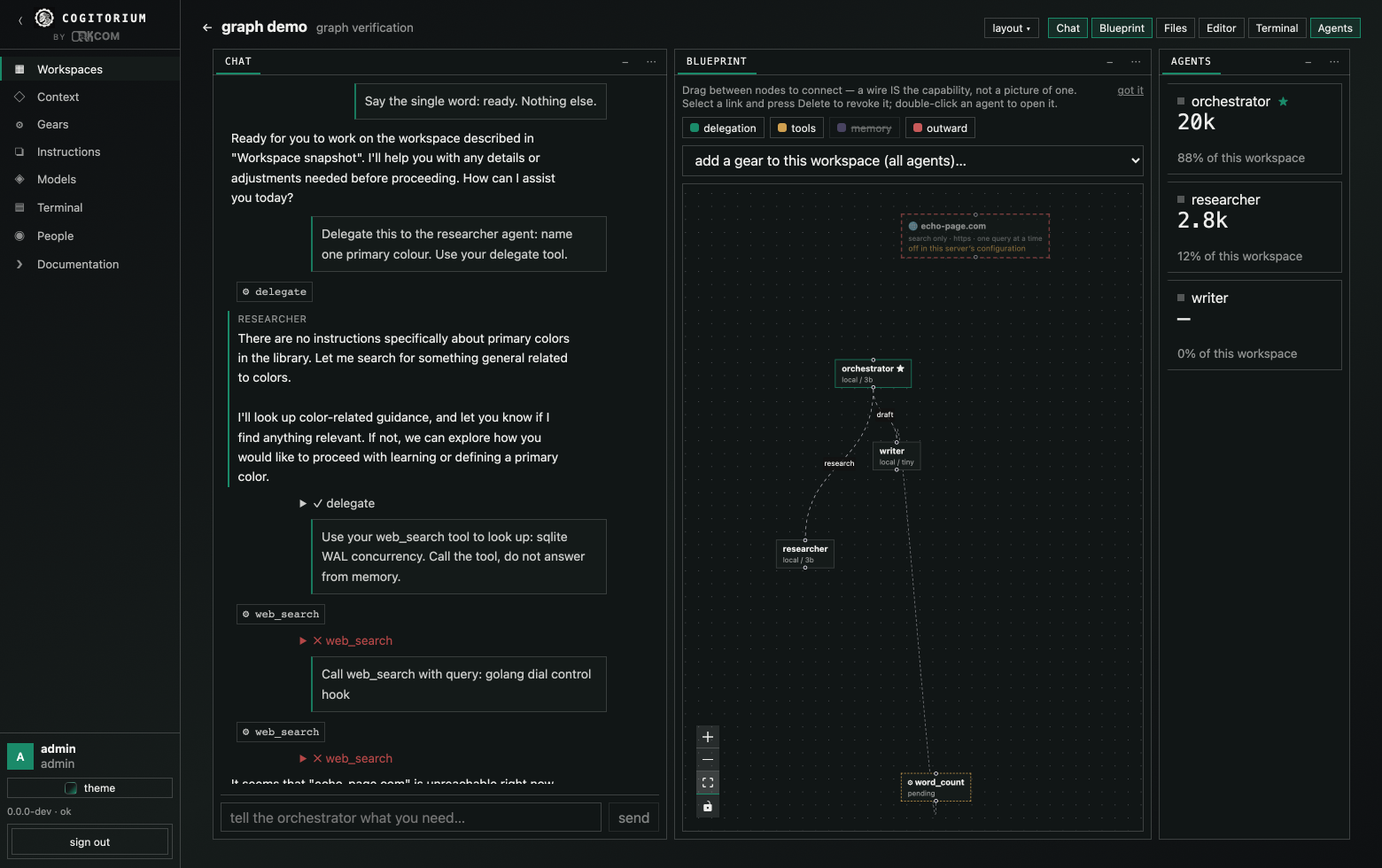
The orchestrator calls agent_create and then delegate. You see a ⚙ chip per
tool call, a collapsible ✓/✗ result row, and the worker’s answer in its own
labelled bubble.
Through the API instead:
curl -X POST http://127.0.0.1:8688/api/v1/workspaces/1/agents -H 'Content-Type: application/json' -d '{"name":"researcher","role":"You summarize sources accurately and cite them.","model_id":1}'
The wire is the capability
Open Blueprint. Drag from one agent to another to connect them. The hint on the canvas says it exactly:
Drag between nodes to connect — a wire IS the capability, not a picture of one.
An agent can delegate to another only if a wire runs to it. Delete the edge and the capability is gone on the next turn — click the edge and press Delete. Wires are created and deleted, never edited; to change one, remove it and draw the new one.
What an agent carries into a turn
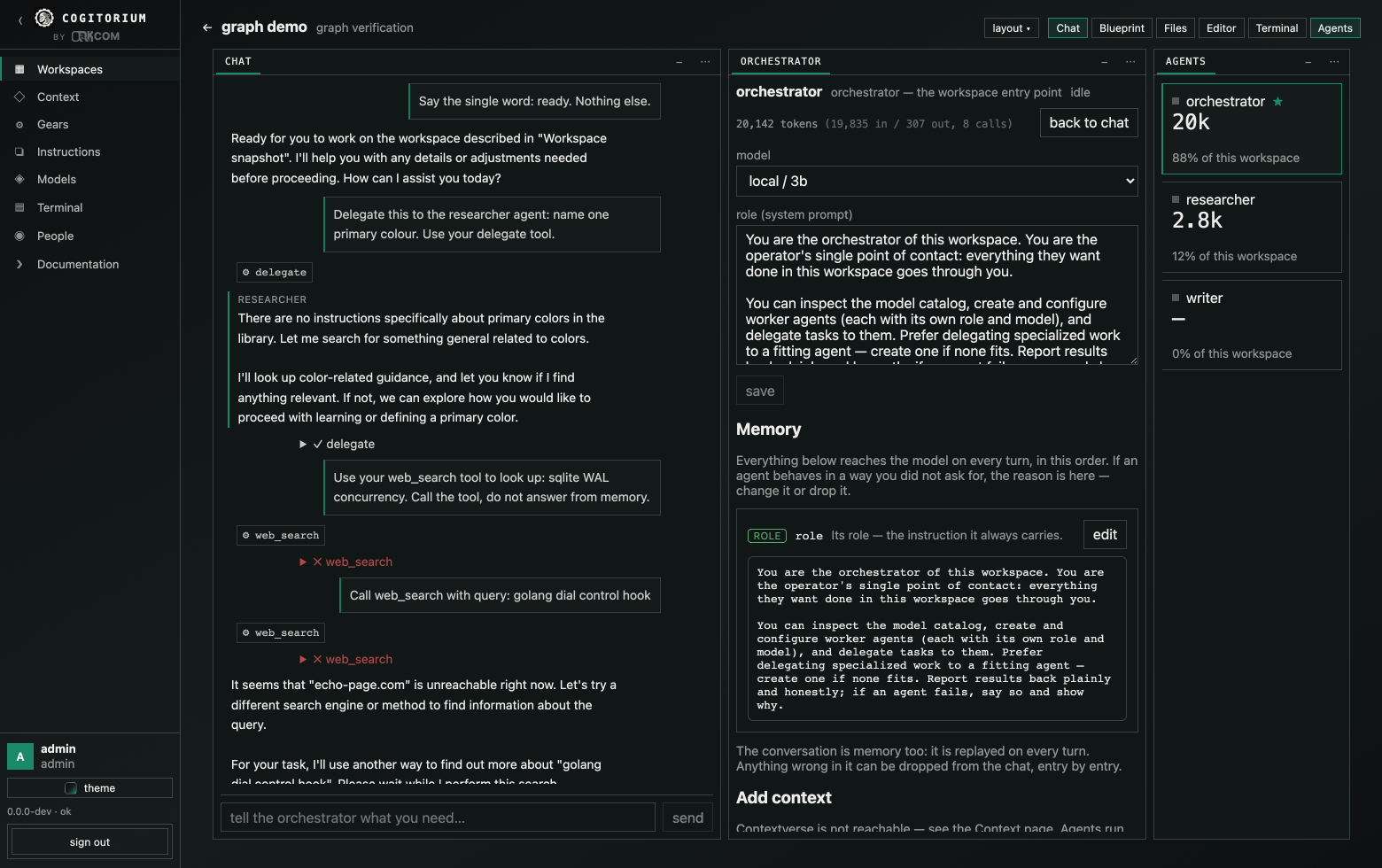
Open Agents, click an agent, and read the inspector. Everything the model sees is listed there in the order it is assembled, and each part can be changed or dropped:
- its role — the system prompt it always carries
- any instructions bound to it from the library
- the context bound to the workspace or to that agent
- the conversation, replayed in full
Click show what this agent sees for the exact assembled prompt. Hover a chat entry and click forget to stop that entry being replayed — the confirmation reads “Forget this from the conversation? It stops being replayed to the model.”
The inspector also carries the running token count per agent, and the Agents panel shows each agent’s share of the workspace total.
3. Gears — tools your agents keep
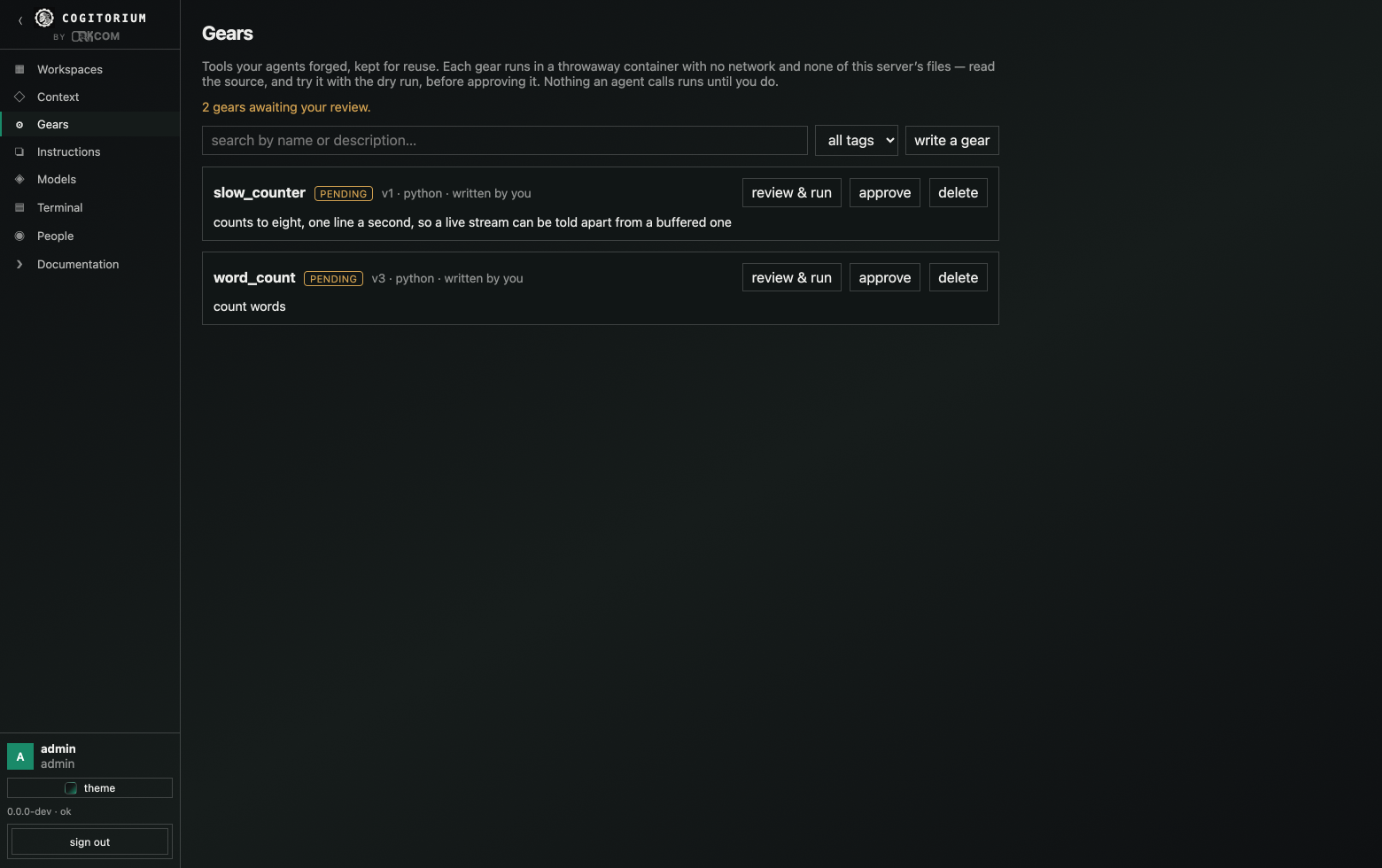
A gear is a small program an agent can call. It survives the conversation, it runs in a throwaway container with no network and none of the server’s files, and nothing an agent calls runs until you approve it.
Write one yourself
Gears → write a gear. Or:
curl -X POST http://127.0.0.1:8688/api/v1/gears -H 'Content-Type: application/json' -d '{"name":"word_count","description":"count words in a string","tags":["text"],"runtime":"python","code":"import sys, json\nargs = json.load(sys.stdin)\nprint(len(args[\"text\"].split()))\n","args_schema":"{\"type\":\"object\",\"properties\":{\"text\":{\"type\":\"string\"}},\"required\":[\"text\"]}"}'
{"id":1,"name":"word_count","tags":["text"],"version":1,"runtime":"python",
 "entrypoint":"main.py","status":"pending","timeout_seconds":60}
Note what came back: status is pending and entrypoint was filled in for
you. Runtimes are python (main.py), node (main.js), bash (main.sh)
and binary. The name must match ^[a-z][a-z0-9_]{1,48}$ — it becomes a tool
name every model has to be able to call.
Arguments arrive as JSON on stdin. Whatever the gear prints on stdout is the result.
Try it before you trust it
The dry run works on an unapproved gear — that is its entire purpose:
curl -X POST 'http://127.0.0.1:8688/api/v1/gears/1/run?dry=1' -H 'Content-Type: application/json' -d '{"args":{"text":"one two three"}}'
{"exit_code":0,"stderr":"","stdout":"3\n","timed_out":false}
In the interface this is review & run on the gear card: read the source, run it with arguments you choose, and only then press approve. Output streams while it runs rather than appearing at the end.
Call it without approving and without dry=1 and it is refused — an unapproved
gear does not execute, whoever asks.
Versions
Saving new code makes a new version and returns the gear to pending. Approval
covers exact content, never a moving target. There is no per-version approval
and no rollback: status is one column on the gear.
What the sandbox does, and does not
With Docker: no network, a read-only copy of only the files the gear was given, 512 MB, one CPU, 256 processes, and the whole container is removed afterwards. Those limits are fixed — there is no per-gear setting for them.
Without Docker the gear runs as a subprocess of the server, with the server’s own file access — including the database, and the provider keys in it. The server says so at startup:
gears will run as unsandboxed subprocesses with this server's file access — an approved gear can read the database, including provider API keys; install Docker or set sandbox: docker to isolate them
In that configuration the approval gate is the only control there is. sandbox: docker
refuses to start when the daemon does not answer; auto warns and continues.
4. Files, the editor and diffs
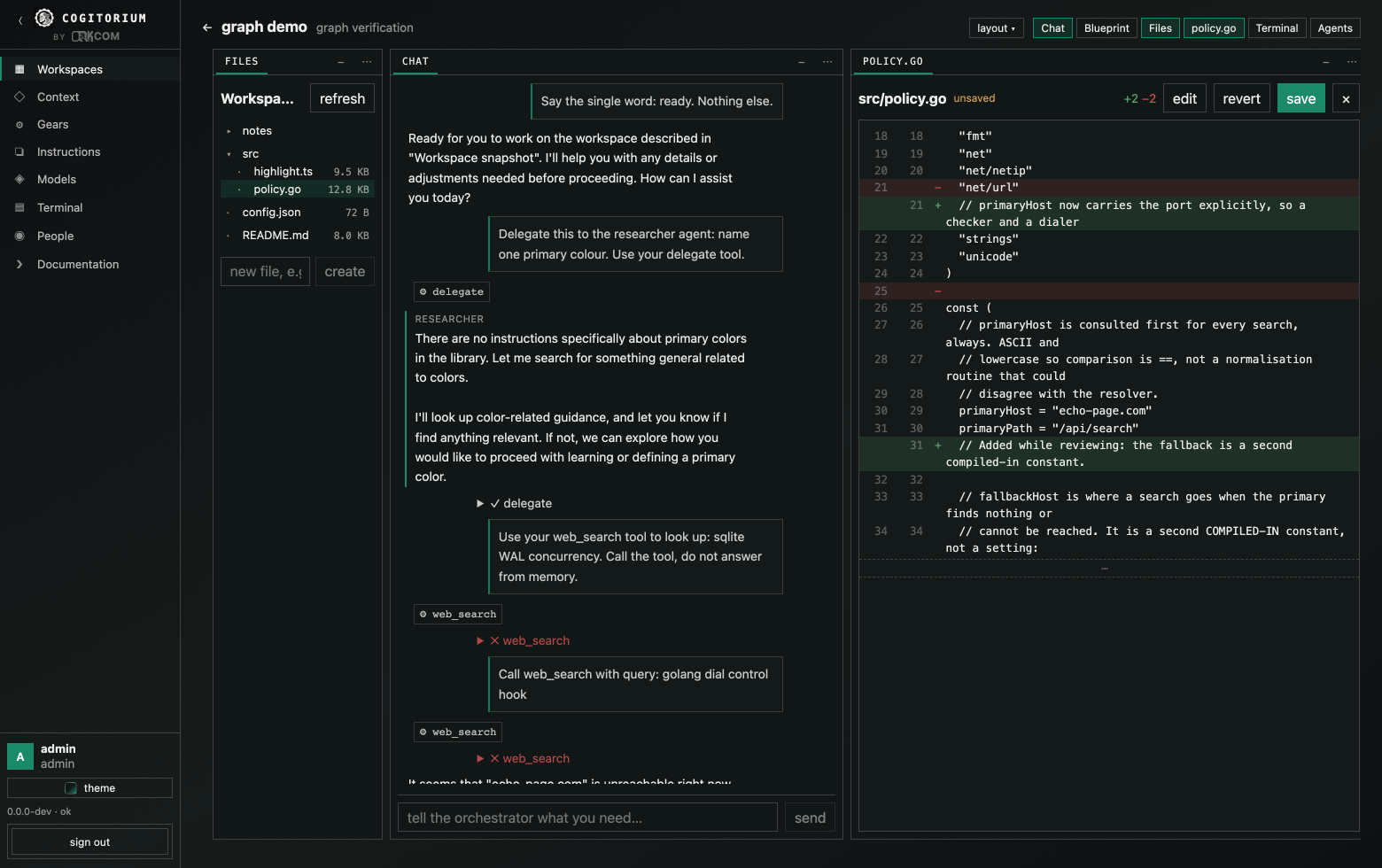
Each workspace has its own directory. Files shows the tree; clicking a file opens it in Editor, which is a real editor with syntax highlighting, not a preview. Save writes the file; the diff view shows what changed, computed locally — there is no git involved anywhere in this.
Files up to 2 MiB are editable; larger ones open read-only, and that limit is not configurable. There is no upload, no download, no rename and no delete — a directory comes into existence when you save a file into it.
5. Memory
Context and memory are stored and versioned by Contextverse’s contextd.
Without it the server starts, says so at GET /api/v1/context/status, and
memory does nothing:
{"available":false,"error":"no context space initialized — run: contextd init solo"}
Homebrew, Scoop and the container image bring contextd along. The container
initialises the space on first start, which fetches a template from GitHub — so
a first docker compose up on a machine with no outbound network comes up with
memory unavailable and says why in the log.
Each workspace gets its own branch plus a shared one, so one workspace’s memory does not leak into another’s. Context (admin only) lists the space and lets you read and edit files in it. Binding context to a workspace or to a single agent is what puts it in front of the model — see the agent inspector for the order it lands in.
6. Letting an agent search the web
Off by default, and there are three locks. All three must be open, in order:
-
The install.
egress: truein the config file, orCOGITORIUM_EGRESS=1. There is no route, no setting and no database row that turns this on — an agent cannot reach it, so no tool call can flip it. It also requires a sandbox, and the server refuses to start otherwise:egress is enabled but gears are not sandboxed. An unsandboxed gear runs with this server's file access and can rewrite the configuration and the grants table, so the gate would be decorative. Install Docker, or set egress: false.A credential for the search destination is required too, and a corporate proxy is refused rather than ignored —
HTTPS_PROXYset means every address check would inspect the proxy instead of the real destination. -
The grant. An operator draws it on the blueprint, per agent.
-
The query. Every individual search stops the turn and waits for a person to approve that exact query. The audit records which kind of authentication each decision had, so a row is never mistaken for stronger evidence than it is.
Only 1 and a case-insensitive true count as on. COGITORIUM_EGRESS=yes
evaluates to false — and overrides a config file that said true.
7. The terminal
Off by default: it is interactive code execution over HTTP. Turning it on takes
terminal: true, and it also requires a sandbox — without one the request
is refused rather than served with the server’s own file access. In Kubernetes
the chart refuses to enable it at all, because there is no Docker inside a pod.
While a gear runs, its output streams here live.
8. More than one person
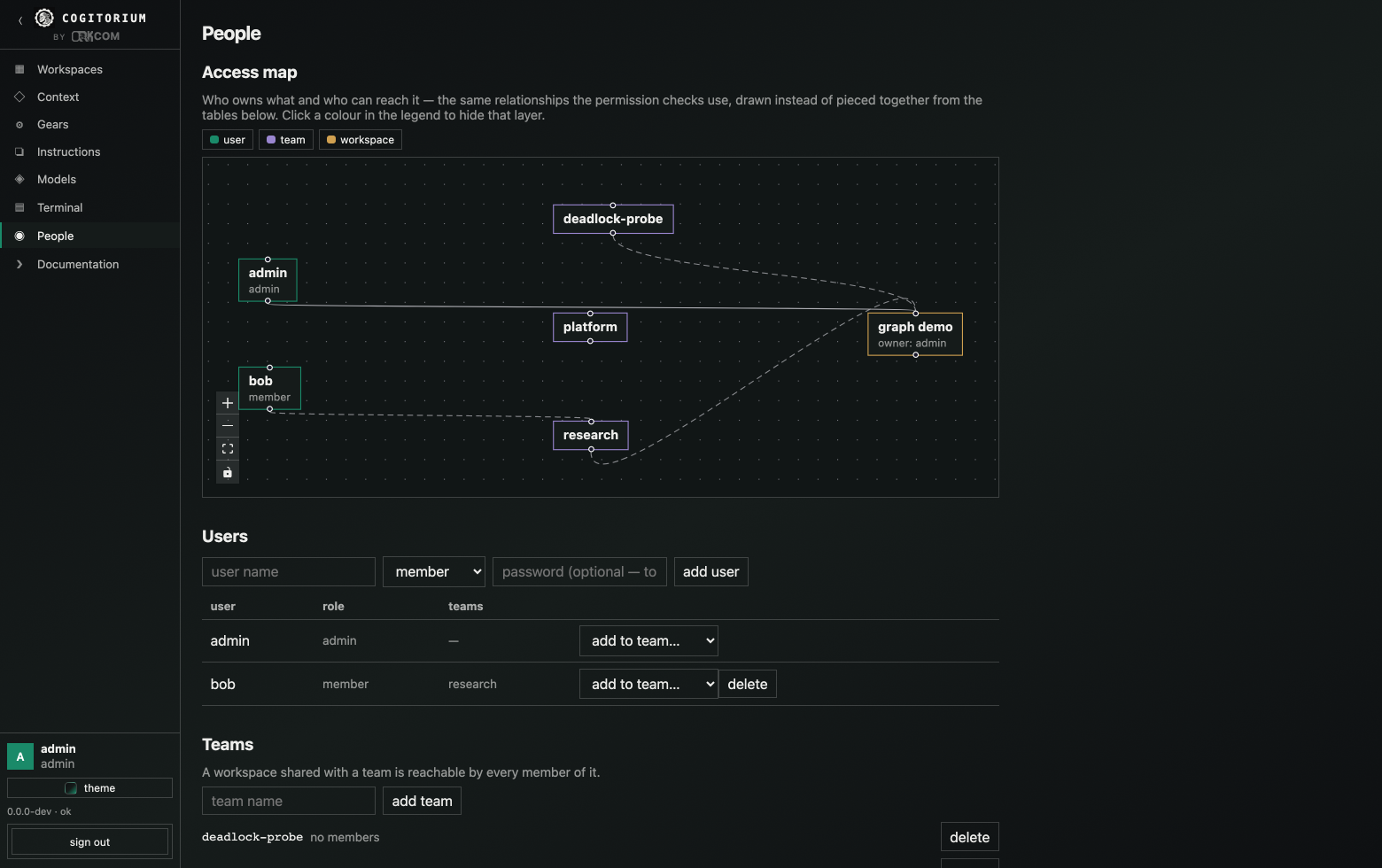
People (admin only) → add user. A token is shown once:
— shown once, only its hash is stored. Copy it now.
Three roles exist: admin, team-lead, member. A member sees the workspaces
they own plus those shared with a team they belong to, and nothing else. Sharing
is per team, not per person. clone copies a workspace to you — blueprint and
all — so someone can build on your arrangement without touching it.
Admin-only: Context, Terminal, People, the model catalog’s destructive actions, and the internet gate.
9. When it refuses
Every message below is the exact text.
| What you did | What you get |
|---|---|
| Named a model id that is not in the catalog | model 1: not found (404) |
Left base_url empty on an openai-compatible provider |
base_url is required for openai-compatible providers |
| Seeded a short admin token | COGITORIUM_ADMIN_TOKEN is 5 characters; it seeds the admin's credential, so at least 24 are required |
Set COGITORIUM_TERMINAL=yes |
Nothing. Only 1/true count; the terminal stays off |
Pointed --config at a file that is not there |
read config /path/nope.yaml: open /path/nope.yaml: no such file or directory |
| Turned on egress without a sandbox | egress is enabled but gears are not sandboxed… |
Asked for sandbox: docker with the daemon down |
sandbox: docker was requested but the daemon does not answer |
Built with go build and skipped the UI build |
web UI is not built into this binary — build with make build (503) |
| Ran a gear that was never approved | the run is refused; the gear is not executed |
Used --port |
Error: unknown flag: --port |
config.yaml is only ever read, never written — a fresh data directory contains
the database and nothing else.
10. What is not here
So that you do not go looking:
- No add-agent button; the orchestrator creates agents, or the API does.
- No way to chat with a worker agent directly — every turn goes through the orchestrator.
- No editing a workspace’s name or description after it is created.
- No editing a gear’s source in the interface, no per-version approval, no rollback.
- No per-gear network, memory or CPU setting; the sandbox limits are fixed.
- No upload, download, rename or delete for workspace files.
- No token management: tokens cannot be listed, named, rotated or expired individually.
- No self-service signup, and no password-change screen.
- No screen for the search audit log, though the route exists.
- Gears do not run as Kubernetes Jobs, and there are no remote agents.